
Every CampusMind agent was built in AI Studio. Your office's agent is next.
Accessibility, Retention, Recruitment and the Virtual Teaching Assistant each began as one university's workflow. Bring us yours, and our engineers will build it with your team.
Each one took the repetitive part off an office's plate.
The people in that office kept the decisions that matter.
See the agents:Accessibility · Retention · Recruitment · Virtual Teaching Assistant
Accessibility
Pulling whole courses from the LMS and tagging PDFs in batches
Your accessibility team certifies every fix
Advising
Reading LMS, SIS and CRM signals and drafting one clear message per student
Advisors approve every message before it sends
Admissions
Answering program questions from your approved pages on web chat, email, SMS and WhatsApp
Counselors step in when a person is needed
Teaching
Answering course questions inside Canvas, Blackboard and D2L at any hour
Faculty choose the sources it answers from
The same studio and the same engineers, working on your workflow.
Think of it as bringing in the team that built those agents to build yours alongside your staff.
Get a free workflow evaluationBring us your use case.
One workflow your office repeats every week, and the systems it touches.
We connect your systems.
Our engineers set up the API connections and build the first workflow with your team.
Your team builds the next ones.
Drag and drop new workflow steps on the connections you already have. Each agent goes live beside the others.
Your campus is what makes the agent useful.
An agent draws on what your institution already has, and your people stay in charge of it.
Explore all integrationsYour knowledge
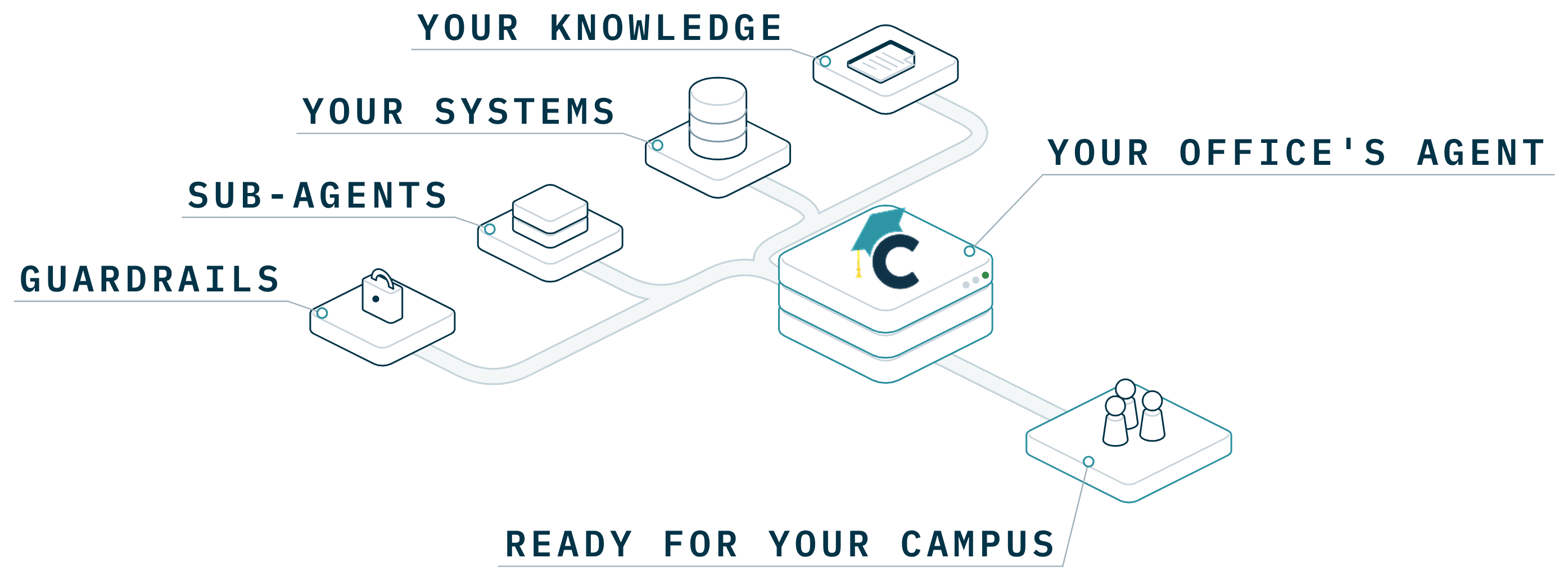
Policies, websites and documents, so answers come from campus content.
Your systems
Your SIS, LMS and CRM, to find data and take action.
 +
+Your sub-agents
Agents it calls on for part of the work, on events or on a schedule.
Your people
Guardrails, review steps and feedback that shape what it does.
It's your IT team that sets the rules every agent follows.
Get the IT evaluation kitUser access
Decide which offices can build an agent, who can publish it and who can use it.
Guardrails
Set what an agent may answer from and when it hands a case to a person.
Observability
Review what each agent did on every run, with the trigger and the result.
Analytics
See which agents people use and where usage is growing.
Allowed models
Choose which of the leading models agents may use.
| Agent | Trigger | Result | Person |
|---|---|---|---|
| Transfer Credit Agent | New transcript | Sent for sign-off | Evaluator |
| Transfer Credit Agent | New transcript | Flagged, no match | Evaluator |
| Check-in drafts | Daily schedule | Drafts ready | Advisor |
| HR Policy Assistant | @ in chat | Answered from policy | None needed |
| Aid questions | @ in chat | Handed to staff | Aid office |
Your team builds the next one in AI Studio.
Once the first agent is live, your team can start the next one on its own:
- Describe it in a sentence and AI Studio drafts the agent
- Start from scratch with full control over its logic, knowledge and tools
- Open a template and adjust it to your office
- Build with drag and drop on the connections you already have
When a workflow needs a new integration, our engineers pick it up.
See pricingAn engineering team that stays with you after the first build.
Royal Cyber's certified Microsoft data and AI engineers connect your systems and build your first workflow with your team.
Microsoft Solutions Partner for Data & AI.
Talk to our engineersCampus data is never used to train models. You can review our security documents at trust.campusmind.ai.
Questions about building in AI Studio
Yes. The Accessibility, Retention and Recruitment agents and the Virtual Teaching Assistant sit in the same marketplace and the same chat as the agents you build.
Our engineers build it with your team, in AI Studio, on your systems. Your team builds the next ones with drag and drop.
Yes. Your team edits the workflow, knowledge and guardrails in AI Studio and tests a change before publishing it.
Your SIS, LMS, CRM, ERP and HR systems, plus 2000+ more apps through our connector library.
In your institution's own Azure tenant, or hosted by CampusMind.
Bring us your office's workflow.
Each of these agents began as one office's workflow, and the next one can be yours. We'll show you how it would run and what the first build takes.