
TRY OUR PDF REMEDIATION
Make Your PDFs Accessible!
Get Started Now
Get Your PDF Ready For All Users
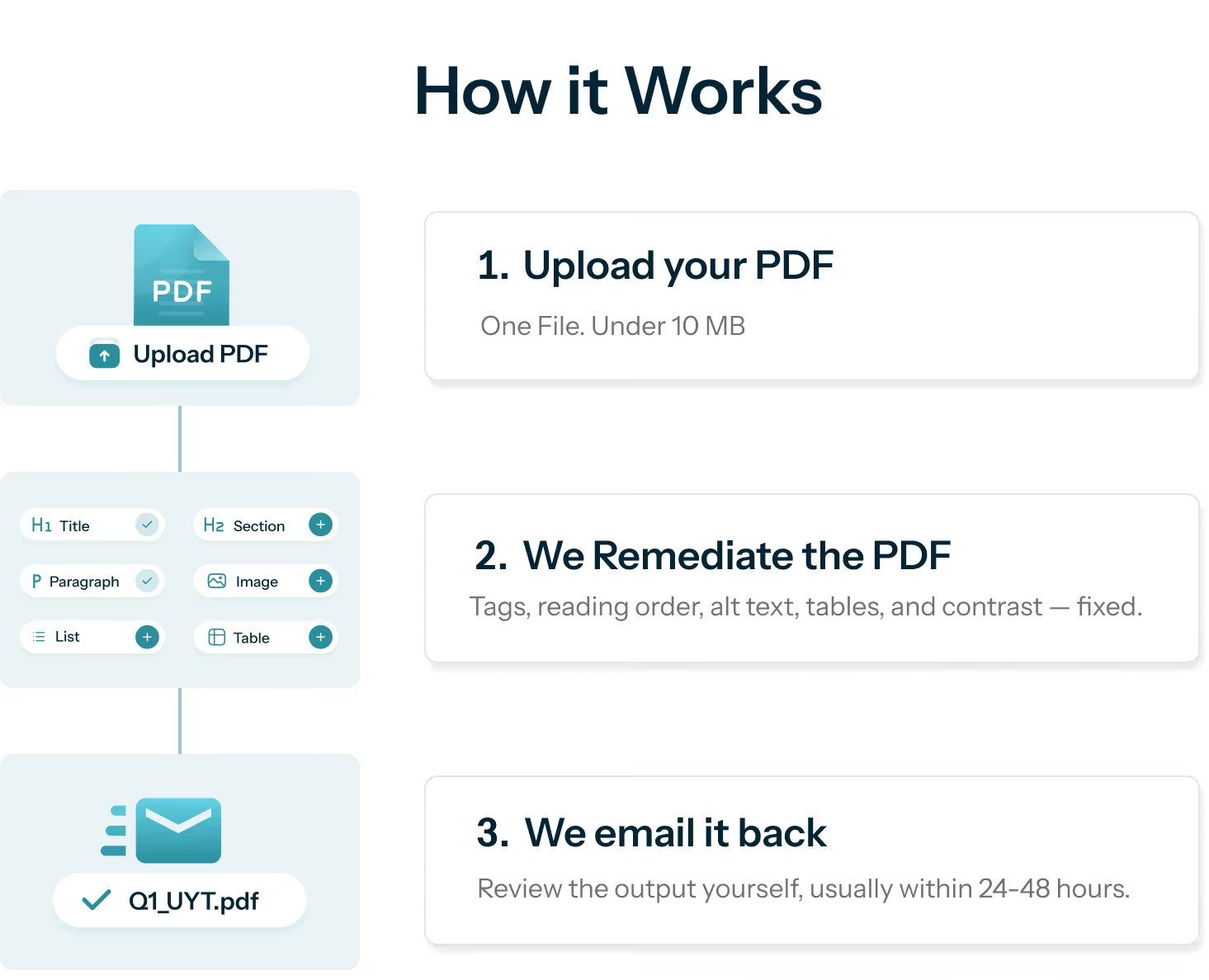
Upload one PDF and we'll fix reading order, tags, alt text, and tables, flag and fix contrast issues, and use WCAG 2.1 AA as our guide. A person reviews it, and you get a record of every change.
It's a hands-on preview of what the CampusMind Accessibility Agent does at scale across your Canvas courses once it's live on your campus, with your team reviewing every file.
It's a hands-on preview of what the CampusMind Accessibility Agent does at scale across your Canvas courses once it's live on your campus, with your team reviewing every file.
Thank you! Your submission has been received!
Oops! Something went wrong while submitting the form.
Empowering Education with Trusted Partners










USE CASES
Measurable Accessibility Improvements
We are not general AI. CampusMind is built from the ground up to solve higher education's unique challenges, informed by industry best practices and global tech blueprints.
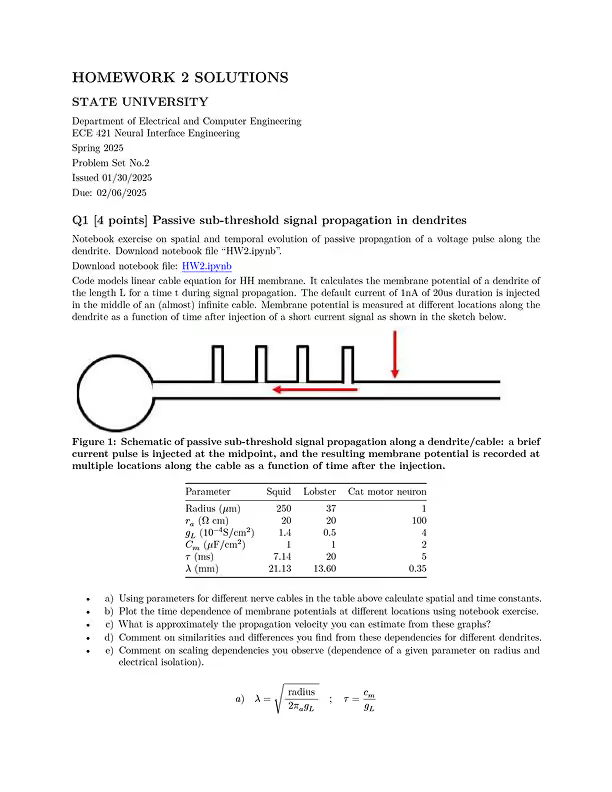
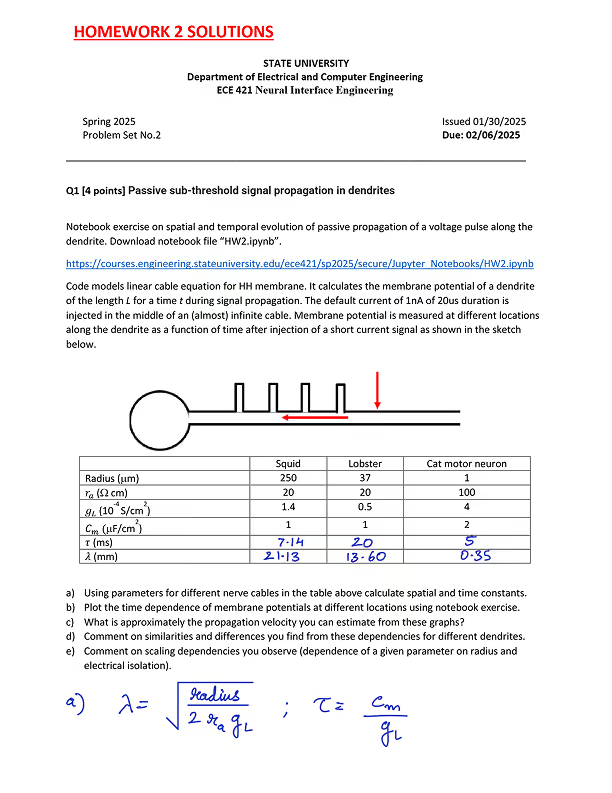
Before Remediation
Missing language and title accessibility tags
Tables without metadata
Images missing annotations
Formulas not understandable by screen readers
After Remediation
Headings and auto-tagging applied
Language and title accessibility tags added
Tables include proper metadata
Tables and formulas explained in accessible text
View All Examples
WHAT OUR USERS SAY
Real Success Stories from Higher Ed Institutions

Sean Kugler
Digital Accessibility Analyst, Northern Arizona University
The tools we’ve tried before didn’t give us the control we needed.
With CampusMind, there is potential to not only reduce our workload but also make our PDFs fully accessible in almost no time.
The ability to clean up complex layouts, keep page flows intact, and ensure everything is compliant has been a game-changer for us.
With CampusMind, there is potential to not only reduce our workload but also make our PDFs fully accessible in almost no time.
The ability to clean up complex layouts, keep page flows intact, and ensure everything is compliant has been a game-changer for us.
SECURE INSTITUTIONAL GOVERNANCE
Built for Higher Ed. Built for Trust
CampusMind keeps your institutional data under your control. It's FERPA compliant and built on Microsoft Azure, and campus data never trains models. You can review our security documents in our Trust Center.
Data Privacy First
Institutional data, total control. No open models or third-party sharing.
Full Compliance
Built on Microsoft Azure and designed to meet US higher education standards.
FERPA-Compliant
HECVAT in Our Trust Center
VPAT & WCAG 2.1 AA
Our VPAT is available through our Trust Center, under NDA.
Emergency Response Integration
Alerts Institutional authorities in
case of self-harm concerns.
case of self-harm concerns.
FAQ
Frequently Asked Questions
Everything you need to know about the accessibility offerings.
What happens after I upload my PDF?
Our accessibility team runs your PDF through the CampusMind Accessibility Agent to fix tags, reading order, alt text, headings, and tables, and to flag and fix color contrast issues, with WCAG 2.1 AA as our guide. A person reviews every file. You'll get it back by email with a record of every change, both the automated fixes and the ones made by our team, so you can review it before publishing.
How long until I get my remediated PDF back?
Turnaround depends on document length and complexity, but is dramatically faster than the 15–30 minutes per page typical of manual remediation. Our team will email you the updated file once it's been processed and reviewed.
Is it safe to upload institutional PDFs?
What if my PDF is over 10 MB or I have many files?
This form is capped at 10 MB for single-file remediation. For larger documents, full Canvas courses, or thousands of PDFs, our Accessibility Agent bulk-remediates entire courses. Get an accessibility quote for your document library. You can also email your document to info@campusmind.ai and our team will be in touch.
Which accessibility standards will my remediated PDF meet?
We fix reading order, tags, alt text and tables, and flag and fix contrast issues, using WCAG 2.1 Level AA as our guide. It's the standard named in the DOJ's ADA Title II rule, and it's aligned with Section 508 and PDF/UA. A person reviews every file, and you get a record of every change, both the automated fixes and the ones made by our team. Public entities serving 50,000 or more people must comply by April 26, 2027; smaller entities and special districts by April 26, 2028.